
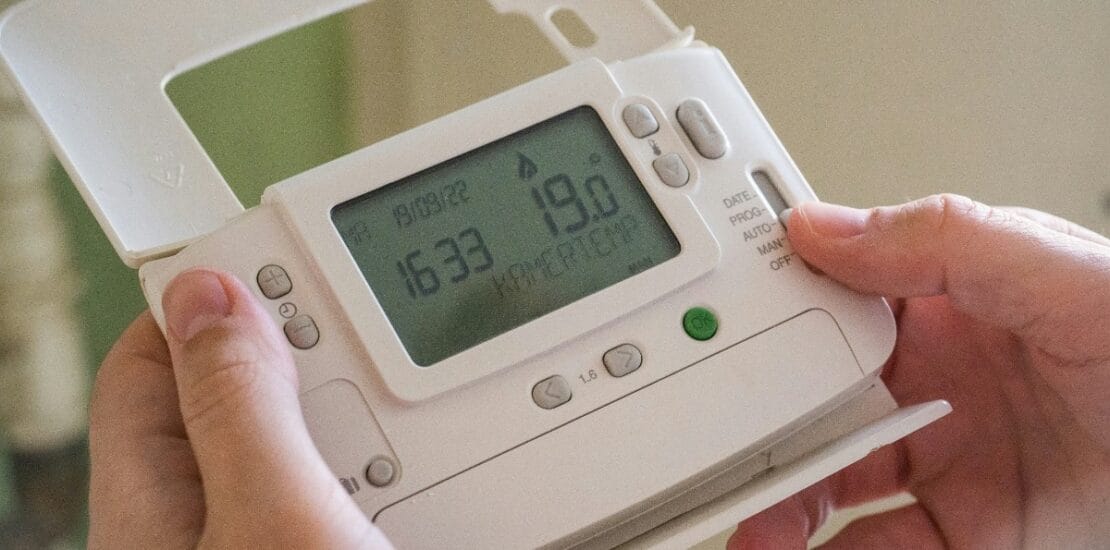
How to Effectively Reset Your Thermostat?
How to Effectively Reset Your Thermostat
Resetting your thermostat can solve many common issues. It can fix incorrect temperature readings or unresponsive controls.
Different brands and models have unique reset procedures. Knowing how to reset your thermostat is essential for maintaining comfort and efficiency.
This guide will walk you through the process. You’ll learn how to reset popular brands like Honeywell, Daikin, and Nest.
We’ll also cover digital and smart thermostats. Whether you’re a homeowner or renter, this guide is for you.
By the end, you’ll be equipped to handle thermostat issues confidently. Let’s get started on resetting your thermostat effectively.
Why Resetting Your Thermostat Matters
Resetting your thermostat is often a quick, cost-effective solution. It can help resolve common issues and improve energy efficiency.
When a thermostat malfunctions, it may fail to maintain the desired temperature. This impacts comfort and increases energy bills. A reset can address these problems.
Here are key reasons why resetting is important:
- Resolves incorrect temperature readings.
- Helps with connectivity issues.
- Enhances thermostat response to HVAC controls.
Regular resets can also prolong your thermostat’s lifespan. This reduces the need for more extensive repairs or replacements. In many cases, a simple reset is all it takes to restore optimal performance.
Also Read: Why is there no power to my thermostat?
General Steps: How to Reset a Thermostat
Resetting a thermostat varies by brand, but there are general steps that often apply. It’s important to follow these steps carefully to prevent further issues.
Before you begin, ensure the thermostat is turned off. This helps avoid electrical issues and ensures a safe reset process.
Here’s a typical process to follow:
- Turn off power to the thermostat.
- Remove the cover carefully.
- Check for a reset button or follow the user manual’s instructions.
- Hold down any designated reset buttons for a few seconds.
- Reassemble and power on the thermostat, then reprogram your settings.

After completion, monitor the thermostat to ensure it operates correctly. If problems persist, you may need to consult the user manual or seek professional help of hvac company.
For detailed information about your specific model, refer to the owner’s manual. Manuals typically provide technical specs, step-by-step reset instructions, and troubleshooting tips tailored to your thermostat’s features and technology. If you don’t have a physical copy, most manufacturers make digital manuals available on their websites for easy access.
Having your manual on hand can make the reset process smoother and help you better understand your thermostat’s innovative features. This resource often answers questions about model-specific resets and can guide you through more advanced settings if needed.
Resetting Your Thermostat at the Circuit Breaker
If your thermostat’s screen won’t respond or standard reset steps haven’t worked, you can perform a reset using your home’s circuit breaker. This method can help restore power and potentially resolve deeper issues.
Follow these steps to reset your thermostat at the breaker:
- First, verify your HVAC system is not actively running to avoid any electrical surges.
- Head to your home’s breaker panel and locate the switch controlling the HVAC system. This is usually labeled for the indoor furnace or air handler—not the outdoor AC unit.
- Flip the corresponding breaker switch to the OFF position. Wait about 20–30 seconds.
- Switch the breaker back to the ON position.
- Allow a few minutes for your thermostat to reboot fully.
After restoring power, check the thermostat’s display to see if it responds and settings can be adjusted. This simple step often resolves unresponsive or blank screens.
How to Reset Popular Thermostat Brands
Resetting specific thermostat brands might seem daunting, yet it is often straightforward. Each major brand has unique procedures. Below, we provide tailored instructions for some popular models.
How to Reset Honeywell Thermostat (Including Pro Series & 3-Button Models)
Honeywell thermostats have different reset methods depending on the model. Understanding these steps can aid effective resetting.
For Pro Series, press and hold the menu button. Keep pressing until the reset option appears. Choose the desired reset type and confirm your selection.
For three-button models, follow this procedure:
- Press and hold Menu.
- Press ‘Right’ until the reset option appears.
- Press ‘Select’ to confirm.

After resetting, reprogram your Honeywell thermostat. This ensures it operates according to your preferences and improves energy efficiency.
Also Read: Why is my thermostat flashing cool on?
How to Reset Daikin Thermostat
Daikin thermostats often require a distinct method. Resetting could involve a power cycle or button combination.
To reset, try the following steps:
- Turn off the thermostat.
- Wait a few moments and turn it back on.
For specific models, refer to the user manual for detailed button combinations. This can ensure a precise reset process.
How to Reset Nest Thermostat (Factory Reset & Soft Reset)
Nest thermostats offer both factory and soft reset options. Each type serves different purposes.
To perform a factory reset, which erases all settings:
- Go to the Settings menu.
- Select ‘Reset.’
- Confirm the factory reset option.
For a soft reset, which retains settings:
- Just restart the device from the menu.

by Valentin Zickner (https://unsplash.com/@vzickner)
After reset, reconfigure your settings for optimal performance.
How to Reset Trane Thermostat
Trane thermostats often involve a simple reset process. Follow these steps for success:
- Switch off the power to the thermostat.
- Remove and reinstall the batteries.
Alternatively, find and press the reset button if available. This process resolves many simple issues efficiently.
If your Trane thermostat is a programmable model like the XR302, XR303, 202, or 203, there’s an additional method that can be handy—especially if a voltage spike or static discharge causes the display to go blank or act erratically:
- Gently remove the thermostat from its wall plate.
- Take out the batteries and leave them out for about 2 minutes.
- After two minutes, reinsert the batteries and place the thermostat back onto the wall plate.
This approach helps clear out temporary glitches and restores normal operation, making it a reliable fix for common electronic hiccups.
How to Reset Dometic Thermostat
Dometic thermostats demand a specific approach. Knowing your model helps in executing the correct reset.
Here’s a general guide for Dometic models:
- Press and hold specific buttons as per manual instructions.
If needed, consult the manual for particular button combinations. This ensures a successful reset.
How to Reset a Digital or Smart Thermostat
Digital and smart thermostats come with unique reset functions. They often offer app-based solutions.
For a general reset, consider these steps:
- Check for a reset button.
- If available, press it gently.
- Follow app instructions for smart devices to initiate a reset process.
Consult your user manual or app guide for precise steps. This ensures device compatibility and successful troubleshooting.
Can a Professional Remotely Troubleshoot and Fix Issues with a Smart Thermostat?
Yes, in many cases, a professional HVAC technician can troubleshoot and even resolve issues with your smart thermostat remotely—provided your device is internet-connected and you’ve enabled remote diagnostics features through your app or user account. Brands like Honeywell, Nest, and Ecobee all offer remote access options, allowing experts to run diagnostics or make adjustments without needing an in-person visit.
If your smart thermostat is acting up and simple resets haven’t worked, reach out to a certified technician or your HVAC company. With your permission, they may be able to review error codes, update settings, or guide you through further steps—all from a distance. This can save time and help get your system back on track faster.
How to Calibrate a Thermostat After Resetting
Calibration ensures your thermostat reads temperatures accurately, essential after a reset. It’s a simple yet important process to align its settings with real room conditions.
To calibrate your thermostat, follow these general steps:
- Check the current room temperature with a precise thermometer.
- Adjust the thermostat setting accordingly.
- Follow user manual instructions for specific calibration methods.
Accurate calibration improves comfort and energy efficiency. Always recheck after a few hours to ensure correct readings.
Troubleshooting: What to Do If Resetting Doesn’t Work
If resetting your thermostat does not solve the issue, there are still steps to take. It’s crucial to identify whether the problem is mechanical or digital in nature.
Consider these troubleshooting tips:
- Check all connections and wiring for defects.
- Ensure the thermostat has working batteries.
- Verify that the HVAC system is functional.
Sometimes, it helps to look for signs of a faulty thermostat. For example:
- The thermostat display is blank or unresponsive.
- Room temperature doesn’t match the setting.
- The system turns on for heat but not cooling (or vice versa).
- The screen blinks messages like “Cool On” or “Heat On,” but your system doesn’t run.
If you notice unusual behaviors—like the thermostat saying “Heat On” but the furnace stays off, or the “Cool On” indicator blinking without cooling—there may be a deeper issue. Also, features such as a “Hold” setting can sometimes lock the temperature, preventing changes. Double-check if your thermostat has any active holds or schedules that may override your manual settings.
For smart or programmable thermostats, pay attention to automations or schedules that might revert your preferences unexpectedly. If your device keeps reverting to unwanted settings, try turning off programmed schedules or smart features through the menu or app.
Persistent problems may indicate a deeper issue, requiring expert help. Always consult your thermostat’s manual for guidance tailored to your model.
What to Do If the Thermostat Screen Is Blank or Unresponsive
A blank thermostat screen or unresponsive buttons can sometimes be fixed with a simple reset at the hardware level. Start by carefully removing the thermostat from its wall mount—most models pop off with gentle but firm pressure. Wait about 30 seconds, then snap it securely back onto the wall plate.
This manual reconnect can help re-establish the connection between the thermostat and its power source, which often restores normal function. Be sure not to force anything, and always check your user manual for specific instructions to avoid accidental damage. If the screen remains blank or the device is still unresponsive, proceed with further troubleshooting steps below.
Tips for Maintaining Your Thermostat
Regular maintenance can extend your thermostat’s life and efficiency. Simple routines ensure it functions properly.
Consider these maintenance tips:
- Clean the thermostat regularly to prevent dust build-up.
- Schedule firmware updates if applicable.
- Recalibrate frequently for accurate temperature readings.
A healthy thermostat is just one part of a well-running HVAC system. For optimal performance and savings, it’s wise to include your thermostat in your seasonal home maintenance checklist. Along with cleaning and recalibrating, check that your thermostat is mounted securely on the wall, away from heat sources or direct sunlight, as these can cause false readings.
If your thermostat uses batteries, replace them at least once a year. And for smart thermostats, keep an eye out for software updates—these not only improve performance but can also add helpful new features.
Taking these simple steps helps ensure that your HVAC system operates smoothly, lasts longer, and keeps your home comfortable year-round.
When Should You Replace Your Thermostat?
Sometimes, even after multiple resets and troubleshooting, a thermostat still refuses to cooperate. In these cases, it might be time to think about a replacement.
Consider replacing your thermostat if:
- It repeatedly malfunctions or fails to respond to settings.
- The display is unresponsive or frequently blank.
- Your energy bills have increased despite regular use.
- The thermostat is outdated and lacks modern efficiency features.
Before making a switch, consult an HVAC professional to confirm compatibility with your current system. This is also an opportunity to consider upgrading to a smart thermostat—brands like Nest, Ecobee, and Honeywell offer modern options that can give you greater control and potentially reduce energy costs.
Choosing the right replacement ensures both comfort and efficiency for the long run.
When to Call a Professional
If resets fail, or the thermostat shows no improvement, consulting an HVAC expert is advised. They offer specialized solutions.
Conclusion
Resetting your thermostat can resolve many issues and improve efficiency. Understanding how to reset different models empowers you as a homeowner. Remember, if problems persist, professional help is just a phone call away. It’s the smart choice for peace of mind.