Why Does My Thermostat Say “Wait”?
Why Does My Thermostat Say “Wait”?
If you’ve glanced at your thermostat and noticed the word “wait” or “waiting” displayed on the screen, you might be wondering, “Why does thermostat say “wait”?” Is your air conditioning system broken? Should you be concerned? Don’t worry—this is a common occurrence, and in most cases, it’s nothing to panic about. Understanding what this message means and why it appears can help you troubleshoot the issue quickly and get your cooling system running smoothly.
What Does “Wait” on a Thermostat Mean?
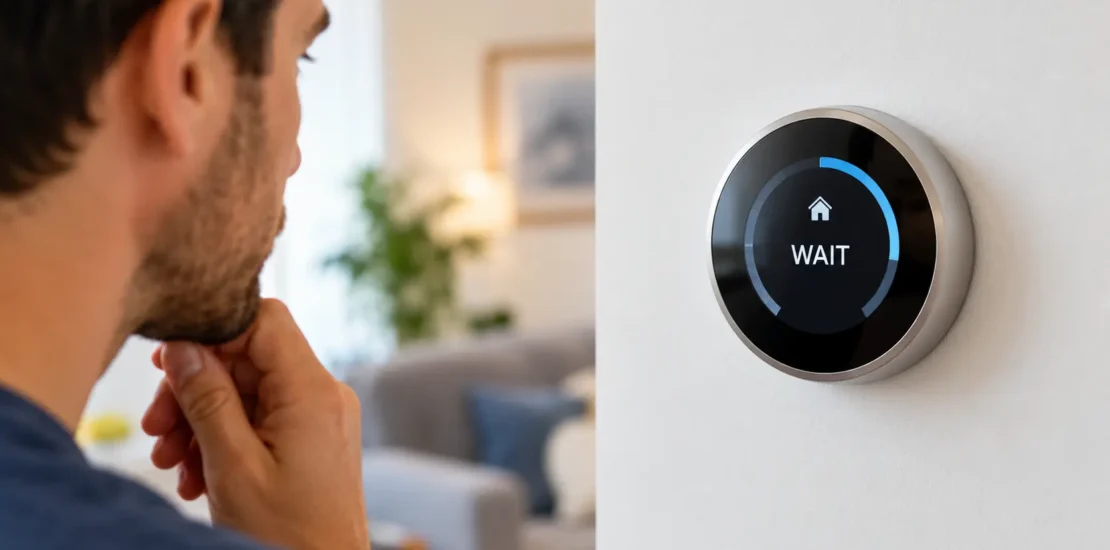
When your thermostat displays “wait,” “waiting,” or “delay” on its screen, it’s telling you that your HVAC system is in a protective hold state and will begin operating shortly. This is a safety feature built into most modern thermostats.
The message you see that says “wait” is not an error code. Instead, it’s a normal part of the startup of your system. Your thermostat performs various checks and safeguards before letting your air conditioner or heating system turn on. You will see this message at that time. Depending on your thermostat model and the cause of this state, this delay can vary between 3 and 10 minutes.
As stated by the U.S. Department of Energy, short-cycle damage reduces the compressor’s life expectancy. Short cycling can prevent the compressor from reaching a stable operating temperature. This causes internal components to suffer thermal stress, possible seizure of components due to lubricant failure, and a surge in the starting current of the motor. To stop this, the wait state enforces a minimum delay between the shutdown and the restart.
If you are still thinking, “Why does my thermostat say “wait”?” Think of it as your thermostat’s way of saying, “Wait, I’m getting everything ready for you.” It is meant to prevent damage to the HVAC system as well as keep it functioning safely and efficiently.
Why Does the Thermostat Say “Wait” Often?
Your thermostat shows the wait message for various reasons. The factors below will help you learn what is normal and what’s not normal or an issue.
Power Outage or Power Loss
When power is restored following a power loss at your home, the thermostat enters a “wait state.” This prevents the HVAC system from activating immediately after a power outage, as this could put pressure on the compressor and damage electrical components. Your thermostat will take time off before working again. This feature is mandatory for HVAC manufacturers as per ASHRAE (American Society of Heating, Refrigerating and Air-Conditioning Engineers) guidelines.
If you are asking, “Why does my Honeywell thermostat say wait?” Well, it may mean that the system is getting started.
Recent Thermostat Installation or Battery Replacement
If a new thermostat has been installed or the batteries of the wireless thermostat were just replaced, then the wait message is normal. It will take time for the system to set up and communicate with your HVAC. This procedure guarantees proper communication between your thermostat and heating/cooling equipment.
Recent HVAC System Maintenance or Reset
Thermostats usually wait after servicing, replacing components or manually resetting an HVAC unit. This allows the system to stabilize and ensures all mechanisms are working properly before the cooling or heating system starts up.
Compressor Short Cycle Protection
Most thermostats include a feature that prevents the compressor from cycling on and off too frequently. If your AC recently shut off, the thermostat may display “wait” to ensure sufficient time passes before allowing the system to restart. This protects your compressor from damage caused by rapid cycling.
According to the Air Conditioning Contractors of America (ACCA), short cycling is extremely damaging because it causes thermal stress, lubrication failure, and electrical stress on the compressor motor.
If you want to know, “Why does my Trane thermostat say waiting?. Here, the message means that the thermostat is protecting the compressor.
Extreme Temperature Conditions
In case of a dramatic drop in your home’s temperature or if you just walked into a cold house, wait mode helps the thermostat to protect sensitive components. This is more common during winter months when the heating system requires careful startup.
System Malfunction Detection
If your thermostat detects a potential problem with your HVAC system—such as a clogged filter, low refrigerant, or a malfunctioning component—it may enter wait mode while it performs diagnostics. This prevents the system from operating under potentially unsafe or damaging conditions.
Also Read: What does wait mean on thermostat
Quick Checks You Can Do First
Before calling a professional, try these simple troubleshooting steps to address the “wait” message on your thermostat:
Check Your Thermostat Display
First, confirm that your thermostat is clearly displaying “wait” and note how long it has been showing this message. If it’s been less than 10 minutes, it’s likely still in its normal startup sequence. Most thermostats clear the wait message within this timeframe.
Verify Power Supply
Make sure your thermostat has power. Hold the power button for 5 seconds. If the thermostat uses batteries, replace the batteries with fresh ones. For hardwired thermostats, check that the breaker controlling your HVAC system hasn’t tripped. If it is, turn it back on.
Inspect Your Air Filter
A clogged air filter can trigger wait messages on some thermostat models. Locate your air filter—typically found near your furnace or return air vent—and check if it’s dirty or blocked. If it appears clogged with dust, replace it with a new filter of the correct size and rating.
Look for Error Codes
Some thermostats also show error codes with a “wait” message. Refer to the manual or website of your thermostat’s manufacturer to find out what the error numbers mean. With this information, you can identify specific things that need attention.
Listen for System Sounds
Listen to your HVAC system while you wait. As the system is being initialized, you may hear some clicking, humming, and fan noise. These noises usually mean things are working well. Loud grinding, squealing, or any other odd noise indicates a problem.
Also Read: Thermostat clicks but ac does not turn on
How to Fix a Thermostat?
Most thermostat “wait” messages will clear by themselves. If the message continues, this is what to do.
Wait for the Timeout Period
Allow your thermostat to start up for 10-15 minutes. Most of the time, the wait message will go away, and your computer will start working again. Please avoid changing settings repeatedly so as not to restart the initialization process.
Adjust Your Thermostat Temperature
Sometimes simply adjusting your thermostat temperature setting can prompt the system to move past the wait state. Try raising or lowering the temperature setting by a few degrees, then wait a few minutes. This action signals your thermostat that you want the system to operate.
Restart Your Thermostat
In some thermostats, you can restart the thermostat by removing the batteries (if it applies) for 30 seconds and putting them back. For hardwired ones, switch the breaker controlling your HVAC off for 30 seconds, then turn it back on. Frequently, this “soft reset” eliminates the wait messages.
Replace Your Air Filter
If the inspection showed a dirty air filter, replacing it is an easy fix that clears wait messages. A new filter can improve airflow and make your system work better, which might help in clearing the wait state.
Check Thermostat Settings
Check the settings on your thermostat to make sure it’s turned to your desired mode, cooling, heating or auto and that the temperature setting makes sense. A thermostat will go to wait mode when the settings do not make sense or are not complete.
Also Read: Why is my thermostat not getting power
Common Thermostat Models and Wait Messages
Thermostats sometimes go into wait states, which may be seen on the thermostat display. Information regarding the relevant models can help you in the long term.
| Brand | What It Says | What It Means |
| Honeywell | Wait | The system is getting started |
| Trane | Waiting | Protecting the compressor |
| Nest | Delay | Getting ready to cool or heat |
| Ecobee | Startup Delay | The system is warming up |
When to Call a Professional for Thermostat Repair?
Although most of the “wait” messages either resolve by themselves or with basic troubleshooting, some of them may require professional help.
Contact for professional assistance if:
- The “wait” message persists for more than 15-20 minutes
- The message appears multiple times daily or several times per week
- Your system isn’t operating at all despite the wait message clearing
- You see error codes in addition to the wait message
- Your thermostat was recently installed, and the wait message never clears
- You notice unusual sounds or smells coming from your HVAC system
An experienced HVAC technician can:
- Run diagnostics on the system to determine the cause of continued wait messages.
- Check if your thermostat is compatible with your HVAC system and recommend upgrades.
- Look for any underlying mechanical problems with your air conditioning or heating system that might be causing wait states.
- Remove older, faulty thermostats and replace them with better and latest options available.
- Carry out preventive maintenance so that the chance of wait messages and other HVAC problems is reduced.
- Clarify the thermostat’s function and the use of its features.
When to Call COOL-AID CO.
The “wait” message on your thermostat is usually not a cause for concern. It is an automatic safeguard for your HVAC system to stop it from malfunctioning. In most cases, the message disappears within 10-15 minutes, and your system resumes normal operation.
By understanding what triggers this message and knowing how to respond, you can troubleshoot simple issues yourself.
If the wait message doesn’t go away or displays regularly, professional diagnosis from COOL-AID CO. ensures your system is functioning properly and safely. Don’t let the thermostat confusion leave you without comfort. Whether you need clarification on what your thermostat is telling you or professional service to address underlying HVAC issues, we are ready to help. Contact us today for expert thermostat diagnosis and HVAC system maintenance that keeps your home comfortable year-round.