
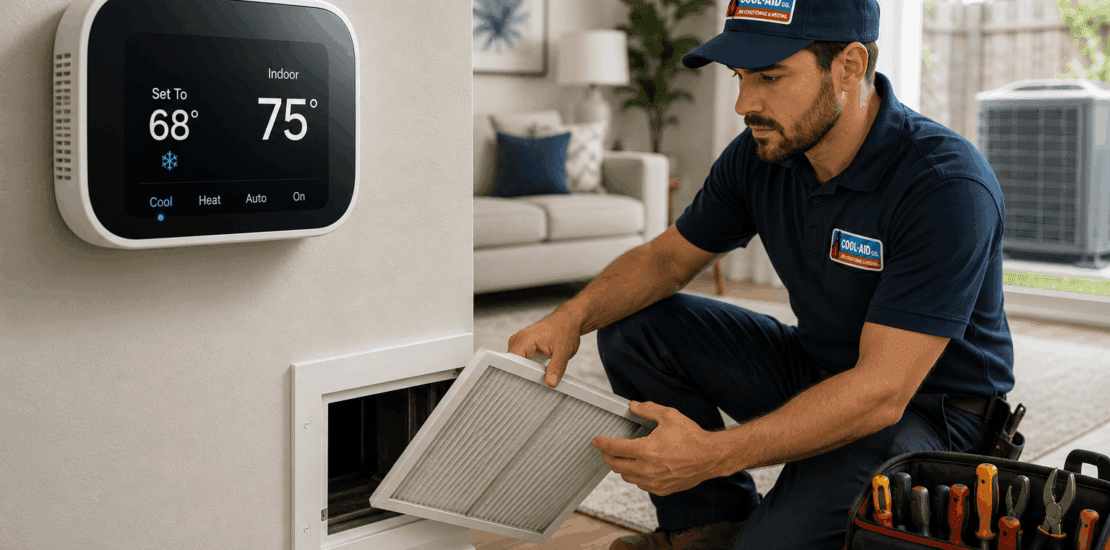
AC Set to 68 But Reads 75: Troubleshoot and Fix
ac set to 68 but reads 75
If your AC is set to 68 but reads 75, your system is telling you one of two things: either the thermostat setting is not being reached, or the thermostat is not accurately reading the room temperature. In a typical U.S. home, a properly sized and well-maintained central air system should gradually lower indoor temperature under normal conditions. When the gap stays at 7 degrees or more, it is time to troubleshoot.
This guide walks through the most common reasons a thermostat setting and actual room temperature do not match, what you can safely check yourself, and when it is smarter to call an HVAC professional.
What It Means When the Thermostat Is Set to 68°F but Shows 75°F
Your thermostat displays two different temperature ideas:
- Set temperature: The temperature you want, such as 68°F.
- Current indoor temperature: The temperature the thermostat senses in the room, such as 75°F.
When the current temperature is higher than the set temperature, the thermostat should call for cooling. That means it signals the air conditioner to run until the home reaches the set point.
A short delay is normal. For example, if the house is 75°F and you lower the thermostat to 68°F, the AC may need time to catch up. But if the system runs for hours and never gets close, there may be an airflow problem, thermostat issue, refrigerant problem, dirty equipment, duct issue, or sizing limitation.
First, Check Whether the AC Is Actually Running
Before assuming the system is failing, confirm what is happening.
Stand near a supply vent and check the airflow. You should feel cool air coming out while the system is running. Then go outside and check whether the outdoor condenser is operating. In most central AC systems, the outdoor fan should be spinning and you should hear the compressor or condenser running during a cooling call.
If the thermostat says “cool on” but nothing is running, the issue may be electrical, thermostat-related, or safety-switch related. If the indoor blower is running but the outdoor unit is not, the system may be circulating warm indoor air without actually cooling it.
Do not remove electrical panels or attempt to work inside the outdoor unit. Central AC equipment uses high voltage and can be dangerous even when it appears to be off.
Also Read: How to reset a thermostat
Make Sure the Thermostat Is in the Right Mode
It sounds simple, but thermostat settings are a frequent cause of cooling complaints.
Check that the thermostat is set to:
- Cool, not heat or off
- Auto fan, not necessarily “on”
- A reasonable cooling temperature
- The correct schedule or hold setting
If the fan is set to “on,” the blower may run continuously even when the outdoor AC is not cooling. That can make it feel like the system is working when it is only moving air. “Auto” usually means the fan runs only during heating or cooling cycles.
Also check for a programmed schedule. A thermostat may be set to 68°F temporarily, but then revert to a warmer scheduled temperature. If your thermostat has an “eco,” “away,” or “smart recovery” mode, review those settings too.
Also Read: Cool on flashing on thermostat
Give the System a Fair Amount of Time
If the home is already warm, cooling it down can take time. A central AC system is not designed to drop the temperature instantly. Depending on outdoor temperature, humidity, insulation, sun exposure, and system condition, lowering a home from 75°F to 68°F may take a while.
However, there is a difference between slow cooling and no progress. Watch the thermostat over 30 to 60 minutes. If the temperature drops gradually, the system may simply be catching up. If it stays at 75°F or rises, continue troubleshooting.
On very hot days, especially during a heat wave, some systems may struggle to maintain a very low set point like 68°F. Many central air systems are designed to maintain indoor comfort under expected local design conditions, not necessarily to reach very low temperatures during extreme outdoor heat.
Replace or Clean the Air Filter
A dirty air filter is one of the most common reasons for poor cooling. When airflow is restricted, less warm air passes over the evaporator coil, and less cool air reaches the rooms. A clogged filter can also contribute to coil freezing, system strain, and higher energy use.
Check your filter and replace it if it looks dirty, dusty, gray, or matted. In many homes, filters are located:
- Behind a return air grille
- In a filter slot near the furnace or air handler
- Inside the air handler cabinet
Use the correct filter size and make sure the airflow arrow points in the right direction. If you use a very high-efficiency filter in an older or airflow-sensitive system, it may restrict airflow too much. When in doubt, use the filter type recommended for your system.
After replacing the filter, let the AC run and monitor the temperature. If your central AC is set to 68 but reads 75 because of airflow restriction, a clean filter may help, but it may not solve deeper issues if the coil or blower is also dirty.
Check Supply and Return Vents
Air conditioners need balanced airflow. If vents are blocked, closed, or covered, rooms may not cool evenly and the thermostat may never reach the set temperature.
Walk through the home and check that:
- Supply registers are open
- Return vents are not blocked by furniture, rugs, or curtains
- No vents are crushed, disconnected, or covered
- Interior doors are not preventing airflow back to the return
Many homeowners close vents in unused rooms to “save” cooling, but this can create pressure problems in a central air system. It may reduce overall performance and can sometimes make comfort worse.
If one area is comfortable but the thermostat area stays warm, the thermostat location may be influencing the reading. If the thermostat is in a hallway with poor airflow or near a heat source, it may read higher than the rest of the home.
Look for Ice on the AC System
Ice is a warning sign. If the indoor evaporator coil or refrigerant lines are frozen, the AC may run constantly while cooling poorly. You might notice weak airflow, water around the indoor unit after thawing, or frost on the copper refrigerant line near the outdoor unit.
Common causes of freezing include:
- Dirty air filter
- Low airflow
- Dirty evaporator coil
- Low refrigerant charge
- Blower motor problems
- Restricted ductwork
If you see ice, turn the system off or switch the thermostat to fan-only to allow thawing. Do not chip away ice with tools. Once the system thaws, replace the filter if needed and check airflow. If ice returns, call an HVAC technician. Running a frozen system can damage equipment and will not cool the home effectively.
Compare Thermostat Temperature With Another Thermometer
Sometimes the AC is working, but the thermostat is reading incorrectly. Place a reliable digital thermometer near the thermostat, away from direct sunlight or supply vents, and let it sit for 15 to 20 minutes.
If the thermostat reads 75°F but the separate thermometer reads closer to 70°F, the thermostat may be inaccurate or poorly placed.
A thermostat can be affected by:
- Direct sunlight
- Heat from lamps, electronics, or appliances
- Drafts inside the wall cavity
- Nearby supply vents
- Poor calibration
- Low batteries
- Age or internal sensor failure
Replace thermostat batteries if applicable. If the thermostat is old, unresponsive, or consistently inaccurate, replacement may be worthwhile. For smart thermostats, verify that temperature sensors, schedules, and comfort settings are configured correctly.
Check the Outdoor Unit
The outdoor condenser must release heat from your home. If it is dirty, blocked, or not running correctly, the system may blow air that is only slightly cool or not cool at all.
From a safe distance, check for:
- Leaves, grass clippings, or debris around the unit
- Overgrown shrubs restricting airflow
- A fan that is not spinning during a cooling call
- Unusual buzzing, clicking, grinding, or humming
- Warm air not being discharged from the top or side of the unit
Keep plants and debris away from the condenser. You can carefully clear loose debris around the unit, but avoid bending coil fins or spraying electrical components aggressively. If the unit hums but the fan does not spin, or the breaker trips repeatedly, call a professional.
Consider Humidity, Sun Load, and Home Conditions
Temperature is only one part of comfort. High humidity makes the home feel warmer and can make cooling seem ineffective. If the AC is oversized, short-cycling, or not running long enough, it may cool the air somewhat but fail to remove enough moisture.
Other home factors can also make it difficult to reach 68°F:
- Poor attic insulation
- Air leaks around windows and doors
- Unshaded west-facing windows
- Leaky ductwork in a hot attic
- Cooking, laundry, or many occupants adding heat
- Open windows or frequent door openings
If the system works better at night but struggles in the afternoon, heat gain may be part of the problem. Closing blinds, sealing obvious air leaks, using ceiling fans, and limiting heat-producing activities during peak heat can help.
Listen for Short Cycling or Constant Running
How the system runs gives useful clues.
If the AC turns on and off every few minutes, it may be short cycling. Possible causes include thermostat problems, dirty components, low refrigerant, electrical issues, or an oversized system.
If the AC runs nonstop and the thermostat stays at 75°F, the system may be undersized, low on refrigerant, losing cool air through duct leaks, or unable to reject heat properly outside.
Both patterns deserve attention. Short cycling can wear out components quickly, while constant running can raise energy bills and still leave the home uncomfortable.
Refrigerant Problems Require a Professional
Low refrigerant is a common suspicion when an AC is set low but cannot cool. Air conditioners do not “use up” refrigerant like fuel. If refrigerant is low, there is likely a leak or another system problem.
Signs that may point to a refrigerant issue include:
- Warm or barely cool air from vents
- Ice on refrigerant lines or coils
- Hissing sounds near refrigerant lines
- Long run times with poor cooling
- Higher energy bills with less comfort
Refrigerant handling requires proper equipment and certification. Do not attempt to add refrigerant yourself. A qualified HVAC technician can test pressures, locate leaks, repair problems, and charge the system correctly.
Ductwork May Be Losing Cool Air
In many U.S. homes, ducts run through attics, crawl spaces, basements, garages, or other unconditioned areas. If ducts are disconnected, crushed, poorly insulated, or leaking, cooled air may never reach the living space efficiently.
Possible duct-related signs include:
- One or more rooms much warmer than others
- Weak airflow from certain vents
- High energy bills
- Dusty rooms or musty odors
- Cooling that seems worse when the attic is hot
You may be able to visually spot disconnected or damaged duct sections in accessible areas, but duct testing and sealing are usually best handled by a professional. Proper duct sealing can significantly improve comfort when duct leakage is the real issue.
When a 68°F Setting May Be Too Aggressive
Setting the thermostat to 68°F does not make the AC cool faster. It simply tells the system to keep running until that temperature is reached. If your home is at 75°F, setting the thermostat to 68°F instead of 72°F will not increase cooling output.
A more realistic approach is to lower the set point gradually and see whether the system can maintain it. Many households find comfort in the low to mid-70s during summer, especially with good humidity control and ceiling fan use. If you prefer 68°F, your system, insulation, ductwork, and humidity control all need to support that target.
If the AC can maintain 72°F but not 68°F during hot afternoons, the system may not be broken. It may simply be reaching its practical limit under current conditions.
Quick DIY Troubleshooting Checklist
Before calling for service, you can safely check several things:
- Confirm the thermostat is set to cool.
- Make sure the set temperature is below the room temperature.
- Replace dirty thermostat batteries if needed.
- Check for an active schedule, hold, eco mode, or away mode.
- Replace a dirty air filter.
- Open supply and return vents.
- Remove furniture or curtains blocking airflow.
- Look for ice on refrigerant lines or the indoor unit.
- Check whether the outdoor unit is running.
- Clear leaves and debris around the condenser.
- Compare the thermostat reading with another thermometer.
- Note whether the system is short cycling or running constantly.
These steps can help narrow down whether the issue is simple, airflow-related, thermostat-related, or likely mechanical.
Also Read: Why is there no power to my thermostat
When to Call an HVAC Pro
Call a licensed HVAC technician if:
- The outdoor unit does not turn on
- The breaker trips repeatedly
- You see ice that returns after thawing
- Airflow is weak even with a clean filter
- The system runs constantly but does not cool
- You hear buzzing, grinding, or loud rattling
- The thermostat appears accurate but the home will not cool
- You suspect a refrigerant leak
- The system has not had maintenance in a long time
You should also call for help if you smell burning, see water leaking near electrical components, or feel uncomfortable performing basic checks. Safety matters more than saving a service call.
What a Technician May Check
A professional HVAC diagnostic visit may include checking thermostat operation, electrical components, refrigerant pressures, capacitor condition, contactor operation, blower performance, coil cleanliness, temperature split, duct airflow, drain safety switches, and overall system condition.
The technician may also measure the temperature difference between return air and supply air. This helps determine whether the system is actually removing heat. If the equipment is cooling properly but the house still stays warm, the problem may be ductwork, insulation, air leakage, or system sizing.
How to Prevent the Problem From Coming Back
Regular maintenance can reduce the chance that your AC is set to 68 but reads 75 again during peak summer weather. Good habits include:
- Replace filters on a consistent schedule.
- Keep the outdoor unit clear of debris.
- Do not block returns or supply registers.
- Schedule routine AC maintenance.
- Use blinds or curtains during strong afternoon sun.
- Seal obvious air leaks.
- Address uneven room temperatures early.
- Pay attention to new noises, odors, or weak airflow.
A central air conditioner works best as part of a full home comfort system. Equipment condition, duct design, insulation, humidity, and thermostat placement all affect the final temperature you see on the display.
Bottom Line
When the thermostat is set to 68°F but the room reads 75°F, start with the basics: thermostat mode, schedule settings, filter condition, airflow, and whether the outdoor unit is running. If those checks do not solve it, the cause may involve frozen coils, refrigerant problems, dirty components, duct leakage, electrical issues, or system capacity.
A small delay is normal. A persistent 7-degree gap is not something to ignore. If your central AC set to 68 but reads 75 after basic troubleshooting, it is a good time to schedule professional service before the problem leads to higher energy bills, poor comfort, or equipment damage.