
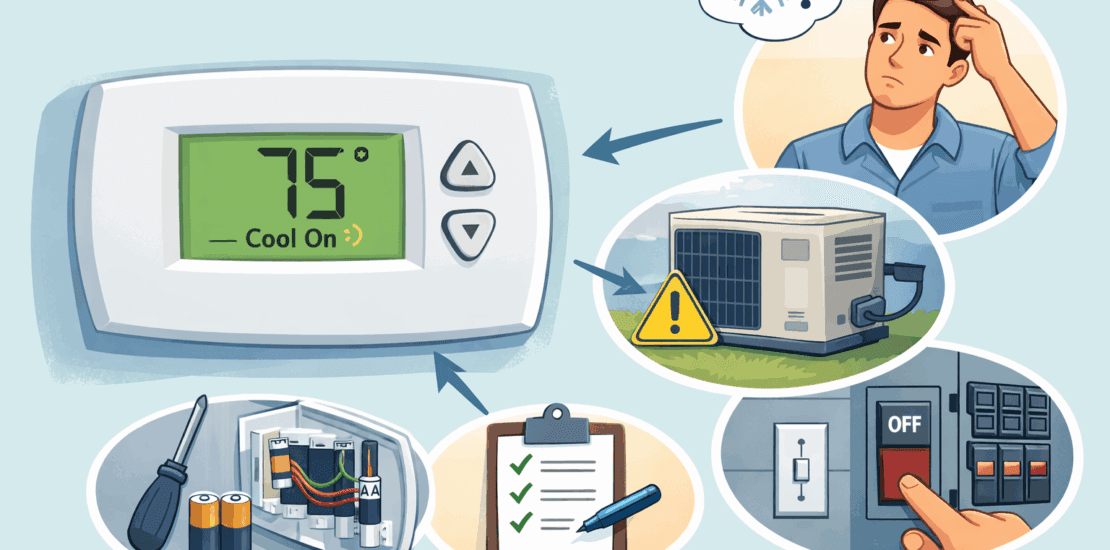
Why is my thermostat flashing cool on?
Troubleshooting a Flashing Cool Thermostat Issue
A flashing “Cool On” message on your thermostat can be puzzling. It often leaves homeowners wondering about the cause.
This guide will help you understand what this message means. We’ll explore common reasons behind it.
You’ll learn how to troubleshoot the issue effectively. Our step-by-step instructions will guide you through the process.
Whether you’re a DIY enthusiast or a homeowner, this article is for you. We aim to make thermostat troubleshooting simple and clear.
By the end, you’ll know when to call a professional. Let’s dive into resolving your flashing “Cool On” issue.
What Does It Mean When “Cool On” Is Flashing on Your Thermostat?
Seeing a flashing “Cool On” on your thermostat can cause concern. This message usually signals a delay in the cooling process. Understanding what it means is essential for homeowners.
The delay protects your system. It’s designed to prevent the compressor from short cycling. This cycle could potentially damage your HVAC unit.
Typically, this delay lasts a few minutes. Depending on the thermostat model, it can range from 5 to 10 minutes. This wait allows your system to stabilize before restarting.
If you see the flashing “Cool On,” consider these reasons:
- The system is in a protective delay.
- Power interruptions occurred.
- The thermostat is recalibrating.
Monitor the situation for a short period. If the flashing persists, more troubleshooting might be needed.

Common Causes for a Flashing “Cool On” Message
A flashing “Cool On” message may occur for several reasons. Identifying these causes will guide you through quick solutions. Here are some common triggers:
One primary reason is a built-in delay mechanism. This feature exists to protect the compressor from frequent starts, which can lead to wear and tear.
Another cause could be a power interruption. When power returns, the thermostat might reset, prompting a delay. This is more common after thunderstorms or power outages.
A third potential cause involves the thermostat’s settings. If incorrectly set, it might not trigger cooling as expected. A higher set temperature can also affect the HVAC unit’s response time.
Additionally, debris or obstructions in the outdoor unit could result in poor performance. Ensuring the unit is clean and unblocked is crucial for optimal function.
To summarize, potential causes include:
- Built-in system delays
- Power interruptions
- Incorrect thermostat settings
- Physical obstructions in the unit

Step-by-Step Thermostat Troubleshooting Guide
Troubleshooting a flashing “Cool On” message requires a systematic approach. Begin by checking fundamental components before moving to more complex solutions. Here’s a detailed guide.
First, start with the thermostat’s settings. Ensure it’s in cooling mode and set lower than the current room temperature.
Next, inspect the power sources. Confirm that the circuit breaker hasn’t tripped and the batteries are in good condition.
After that, examine the air filters. A clogged filter can disrupt airflow and cooling efficiency.
Look over the outdoor unit. Make sure it’s free of debris, and the fan is operational.
Consider resetting the thermostat. This can resolve minor bugs and restore default settings.
For accuracy, use a checklist during your inspection. Check each item off as you proceed:
- Verify thermostat mode and settings
- Inspect and replace batteries if needed
- Clean or replace air filters
- Ensure outdoor unit is clear and operational
- Consider resetting the thermostat
Adhering to these steps can prevent unnecessary frustration. If the problem persists, it might be time to consult a professional.
Regular maintenance goes a long way in avoiding these issues. Investing time in routine check-ups can save costly repairs later.

by Ra Dragon (https://unsplash.com/@radragon)

by Daniel Miksha (https://unsplash.com/@danielmiksha)
1. Check Thermostat Settings and Mode
First, ensure the thermostat is set to “cool.” Verify this by checking the display.
The thermostat should be set lower than the room’s temperature. This prompts the system to start cooling.
Check for features like “hold” or “schedule” that may prevent changes. Here’s a quick checklist:
- Confirm “cool” mode is selected
- Set temperature lower than room temperature
- Look for active schedule or hold settings
Correct settings can resolve a flashing “Cool On” issue quickly.
2. Inspect Power Sources and Batteries
Power issues can result in a flashing “Cool On” message. Check the circuit breaker first to ensure it hasn’t tripped.
Next, examine the thermostat’s batteries if applicable. Dead batteries can disrupt operation. Replace them if necessary.
Finally, ensure all wires are connected securely. Use this checklist as a guide:
- Verify circuit breaker is on
- Check and replace batteries
- Ensure wiring is secure

by Yung Chang (https://unsplash.com/@yungnoma)
3. Examine Air Filters and Airflow
A clogged air filter can cause several issues. Check the filters regularly to ensure optimal airflow.
Replace dirty filters to boost performance and efficiency. Regular replacements prevent overheating and shut-downs.
Look for airflow obstructions near vents. Use this checklist to stay on top:
- Inspect filters regularly
- Replace dirty or clogged filters
- Ensure no obstructions around vents

by Wyatte B (https://unsplash.com/@wy4tte)
4. Look for Issues with the Outdoor Unit
Ensure the outdoor unit is clean and debris-free. A blocked unit can hinder cooling efficiency.
Inspect the fan to confirm it’s functioning. A malfunctioning fan impacts the entire system.
Check the unit for ice buildup, which signals potential issues. Here’s your checklist:
- Clear debris from unit
- Verify fan operation
- Check for ice or obstructions

by Sergej Karpow (https://unsplash.com/@skstrannik)
5. Resetting Your Thermostat
Resetting can solve many simple issues. Consult the manual for specific reset instructions.
Resetting may require a button sequence or power cut. This varies by model.
After resetting, set the thermostat back to desired settings. Use this reset checklist:
- Refer to manual for reset guide
- Perform required reset procedure
- Re-configure settings post-reset

by Paycho Stories (https://unsplash.com/@mammu_psycho)
Special Considerations for Honeywell and Smart Thermostats
Honeywell and smart thermostats offer advanced features. These features can affect how the “Cool On” message appears and functions.
For Honeywell models, consult the user manual. They often have unique troubleshooting steps and error codes.
Smart thermostats require checking app settings. Ensure the firmware is up to date. Doing so enhances performance and resolves many common issues.
Use this checklist for these specific models:
- Consult Honeywell manual for specific codes
- Update smart thermostat firmware regularly
- Check app settings for hidden features
Advanced features can be beneficial, but they also require regular updates and checks.

by isens usa (https://unsplash.com/@isensusa)
When to Call a Professional HVAC Technician
Sometimes, despite thorough troubleshooting, the flashing “Cool On” message persists. This can signal deeper issues in the HVAC system. Recognizing when to call a professional can save time and prevent further damage.
Consider reaching out to an HVAC technician if:
- The issue persists after all steps are tried
- You find unusual sounds or smells from the unit
- There’s visible damage or ice buildup
A professional can diagnose problems that aren’t immediately obvious. Their expertise ensures your system operates efficiently and safely. Don’t hesitate to contact them to avoid costly repairs later.
Preventive Maintenance Tips to Avoid Future Issues
Preventive maintenance can save you from a flashing “Cool On” headache. Regular care keeps your HVAC system in top shape. It also prolongs the life of your equipment.
Start by scheduling routine check-ups with a professional technician. Regular inspections catch small issues before they grow. This includes checking refrigerant levels and ensuring all parts function properly.
Additionally, homeowners can perform simple tasks to maintain their systems:
- Replace air filters every 1-3 months
- Keep the outdoor unit free of debris
- Monitor thermostat settings and schedules

by Антон Дмитриев (https://unsplash.com/@ehmitrich)
Consistent maintenance and monitoring help prevent many thermostat issues. They ensure efficient operation and comfort throughout the seasons. Stay proactive and enjoy peace of mind.
Frequently Asked Questions (FAQs)
Addressing common questions can clarify many concerns. Here’s a quick FAQ for troubleshooting flashing “Cool On” issues. These answers provide straightforward guidance for homeowners.
Why does the cool on keep flashing on my thermostat?
A brief delay often explains the issue. It’s a protective measure for the compressor. Check power and settings if it persists.
How long should the “Cool On” flash before normal operation resumes?
Typically, it lasts between 5 and 10 minutes. If it continues longer, investigate deeper issues.
What immediate steps should I take?
- Check thermostat settings
- Inspect power sources
- Ensure proper airflow and filter cleanliness
These steps can often resolve simple problems. For persistent issues, consider professional help. Keep in mind that routine maintenance can mitigate recurring flashing problems.
Conclusion: Resolving the Flashing “Cool On” Issue
Understanding the causes of a flashing “Cool On” message is crucial. It often prevents unnecessary worry and saves time. Many times, the flashing simply indicates a short delay to protect your system.
Start by checking the basics. Ensure that your thermostat is set correctly. Confirm power sources and clear any airflow blockages. Simple steps can resolve many issues quickly and easily.
Remember, professional help is always available. If problems persist, an HVAC technician can provide the expertise needed. Regular maintenance, however, remains key to avoiding future complications.